
Virtualdub, resize widescreen video for YouTube
YouTube videos are 320 x 240 pixels in size and that presents a problem if you have a widescreen or anamorphic video to upload. This is because it will be squashed into the YouTube format leaving the content looking 'tall and thin'. See Kev's Guide to Widescreen TV for more information, and, if you're still unsure - read on. The final screenshot speaks for itself.
Virtualdub is a free piece of video capture/processing software. Among many other things this software will resize video and you can turn your anamorphic or widescreen video into standard format with letterboxing so it looks right in YouTube. There's no install, just download the software, unzip it and run Virtualdub.
Start by opening your video file in Virtualdub. As default you will see 2 previews of your video. One pane is the original video and the other is the video after any filters you apply to it. As you can see from the screenshot below the problem is clear. My video is 'tall and thin'. The radar in the top right should be a circle not an oval shape. This is because the video is anamorphic, widescreen squashed into standard video size. Normally your widescreen TV will automatically stretch the video and make it look right, but YouTube doesn't. To fix the video for YouTube we need to do this ourselves by resizing the video.

To resize the video you need to add a resize filter. From the Video menu pick Filters... and then in the filters window select Add. From the lengthy list of filters shown select resize. The resize window will be shown and its here where you specify how to resize the video. I'll explain each setting in turn.
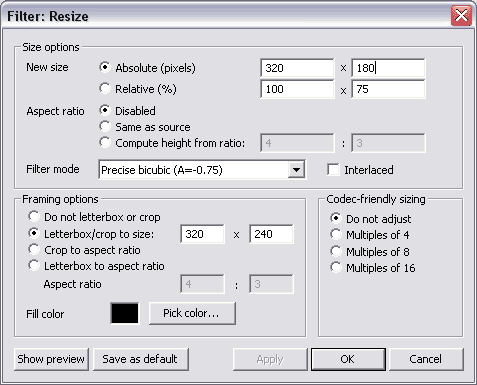
First select Disabled for aspect ratio. This is because we are trying to change the aspect ratio and we don't want a change in the height of the video automatically recalculating the width.
Now we need to input the new height of the video. Now this might be confusing because the video is already 320 x 240 and that's the size for YouTube right? The problem is the video is anamorphic. It was meant to be displayed at a ratio of 16:9. We need to keep the 320 width but resize the height. The calculation is quite simple. The new height will be 320 * 9 / 16 = 180 pixels.
Finally to keep the video size at 320 x 240, in Framing options select Letterbox/crop to size 320 x 240. In our case this will put a black strip at the top and bottom of the picture to fill in the height we lost by making it 180 pixels high.

The end result is the anamorphic video made into letterbox format. See the radar? its a circle now. To finish off select Save as AVI from the File menu and upload to YouTube.
Related articles
Comments(12)
As for me,i prefer use VidCrop.It's prog for crop and resize your video.Try
quite good, easier than this
widescreen rocks!