
Convert MOV video to AVI format
Converting MOV to AVI is reasonably easy and can all be done using free software for Windows.
The whole process requires 3 things:
1. A codec to write the AVI file
2. Quicktime for Windows to read the MOV file
3. RAD Video Tools software which will do the converting
1. Download and install the XVID codec
You will already have a variety of codecs on your PC which Windows uses to decode and encode video files. The reason I recommend installing the XVID codec is that produces relatively small files with quite high video quality, ideal for uploading to YouTube for example. If you haven't got it already, download and install the XVID codec.
2. Download and install Quicktime
We won't actually be using Quicktime, but RAD Video Tools, the software which does the converting needs Quicktime in order to read the MOV file and then convert it. Download and install Quicktime. My recommendation is to avoid the version with iTunes, untick the opt-in checkboxes and don't provide your email address.
3. Download and install RAD Video Tools
RAD Video Tools does lots of neat stuff and you're gonna see lots of stuff about Bink and Smacker - but we only want it for a side function, yep - converting MOV files. Download RAD Video tools and perhaps consider donating to these guys if you find it useful.
Convert your video!
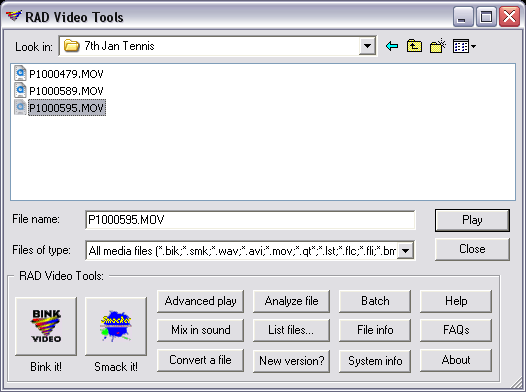
Run RAD Video Tools (after install its in the Bink and Smacker folder in the Start menu). Find your MOV file, select it and click the 'Convert a file' button.
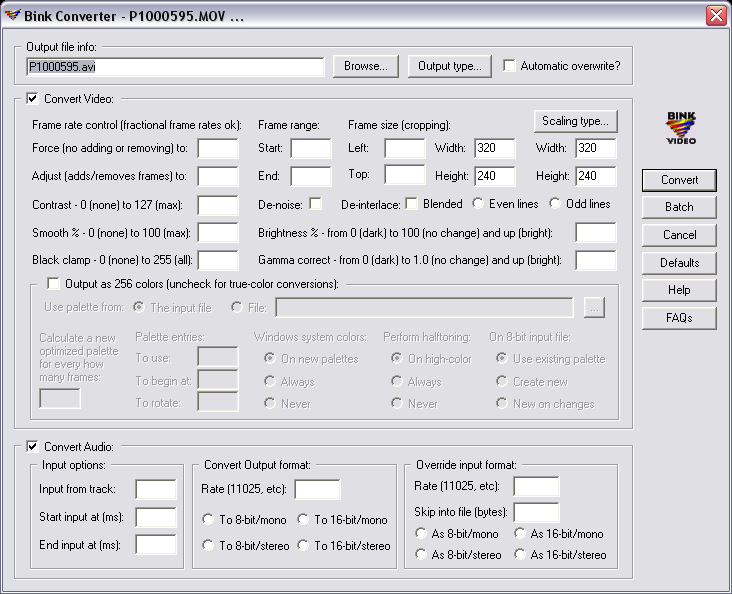
The next Window looks pretty complicated but unless you want to play with any settings, just click the 'Convert' button.
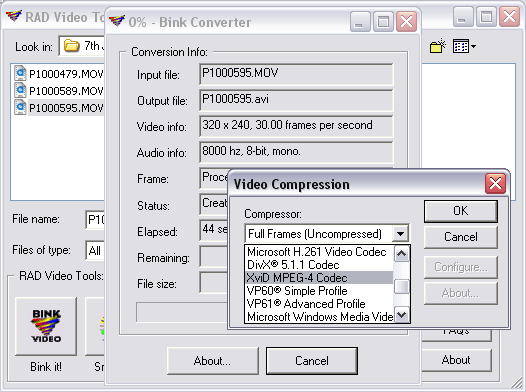
RAD Video Tools will do a (usually quick) evaluation of your file, then prompt you to choose the video compression. This is where you choose XviD MPEG-4 Codec, although feel free to try any codec you like.
Your video will be now be converted. The output file will be in the same folder as your MOV file. Feel free to comment. I've not done many tutorials and wonder if I've got the balance of not going into too much detail vs clear instructions right.