
Sky+ Turn Off Auto Standby
To turn off Sky+ Auto Standby, simply press 'Services' on your remote, go to Sky+ Setup and turn off Auto Standby. Finish with 'Save New Settings'.
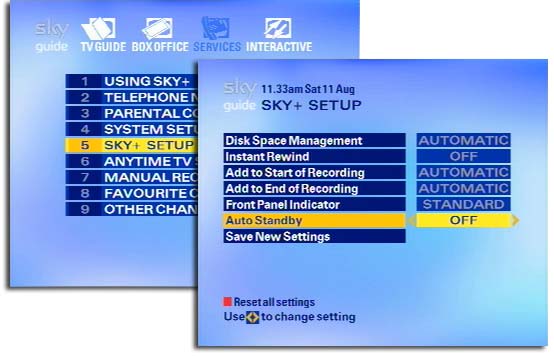
In my stats I've seen a few people arriving at my site after entering search keywords for how to turn off Sky+ auto standby, so I thought I'd blog how to do this. Auto Standby is a relatively new feature of Sky+ which jumps on the green bandwagon to turn off your Sky+ box. The first time I noticed it was when I woke and found my TV had auto turned off due to a lack of picture. Eventually I saw the message informing me that the box was about to go into auto standby mode. How Sky+ decides this I have no idea, because I've even seen it come onscreen shortly after changes channels, so that hardly indicates my box has been left unattended.
If you're looking to program your Sky remote to operate your TV, find Sky remote codes here.
Related articles
Comments(5)
I know this as nothing else has suffered a power cut & no resetting of 1/2 dozen clocks on my equipment!
Now my recordings are without a hitch!